
Product overview
Fixed asset depreciation software, built for CPA firms.
Tax and book depreciation in one asset register: MACRS, Section 179, bonus depreciation, 50-state coverage, Form 4562, and journal entries.
90-second walkthrough
One client, start to Form 4562.
A sample client, Sunrise Bakery, taken from its asset register to calculated depreciation and a mapped Form 4562. It’s the same path you’d take with a real client’s file.
No audio. Use the player controls to pause on any screen.
One register. Two destinations.
Tax depreciation goes to the return. Book depreciation goes to the client’s GL. Both come from the same assets, so cost and in-service date are entered once.
Entered once
One asset register
Cost, in-service date, and GL account shared by both sides
Tax treatment · the return
Federal and 50 states
MACRS, Section 179, bonus, state add-backs
Form 4562 and 4797
Mapped line by line, per activity
Export to tax software
- UltraTax CS
- Lacerte
- ProSeries
- CCH Axcess
- CCH ProSystem fx
- Drake
- GoSystem
- ONESOURCE
Book treatment · the close
Book depreciation
Its own method, life, and salvage
Journal entry
Any month or the full year, disposals included
Import file for the client’s GL
- QuickBooks Online
- Sage Intacct
- Xero
Tied to the trial balance
GL rollforward, per account, to the penny
Federal Tax
Complete MACRS depreciation for all property types. Section 179 up to $2,560,000 (2026). 100% bonus depreciation restored under OBBBA. Section 280F vehicle limits. Disposals with gain/loss and recapture.
MACRS GDS (IRC 168(a))
200% declining balance for 3, 5, 7, 10-year property. 150% DB for 15 and 20-year. Automatic switch to straight-line at the point that maximizes deductions.
MACRS ADS (IRC 168(g))
Straight-line method with longer recovery periods. Required for tax-exempt use property, foreign use property, and certain elected assets. Full ADS tables for all property classes.
Section 179 (IRC 179)
$2,560,000 maximum deduction (2026 OBBBA). $4,090,000 phase-out threshold. $32,000 SUV limit. Business income limitation tracking and proportional allocation across activities.
Bonus Depreciation (IRC 168(k))
100% for property acquired after January 19, 2025 (OBBBA). Pre-OBBBA transition rates for prior acquisitions. Automatic rate selection based on placed-in-service date.
Real Property
27.5-year residential rental and 39-year nonresidential with mid-month convention. ADS 30- and 40-year recovery. Qualified improvement property as 15-year property, eligible for bonus depreciation.
Vehicles & Section 280F
Year-by-year depreciation caps with and without bonus rates. VIN lookup fills in GVWR for the heavy-vehicle determination. Listed property business use percentage tracking.
Want to see this on your own clients? Book a 15-minute call See pricing
Book & Journal Entries
Book depreciation beside tax on every asset. The client’s depreciation JE as a QuickBooks, Sage Intacct, or Xero import file, tied to the trial balance. How CAS teams use it →
Book Depreciation Beside Tax
Every asset carries its own book treatment: straight-line, declining balance, sum-of-the-years-digits, or MACRS, with its own life, salvage, and in-service date. Cost is shared, so book and tax never overwrite each other. Import a book schedule from your current software and the history carries across.
Journal Entries Report
A balanced depreciation entry for any month or the full year, whatever period the client books. Disposal entries land below it. Every figure is book basis, never tax. Exports to Excel and PDF.
QuickBooks, Sage Intacct, or Xero File
The same entry as an import file in each ledger’s own format, ready for the client’s GL. An import file, not a live sync: you review it and post it.
Double-Post Warning
Every export is logged. Come back to a period you already exported and DepreciationPro shows who exported it, when, the journal number, and whether the amounts changed since.
GL Rollforward & Trial Balance Tie-Out
Opening, additions, disposals, and closing per account, next to the client’s trial balance. Upload the TB as a CSV. A row reads Tied only at a variance of exactly 0.00. Click any number to see the assets behind it.
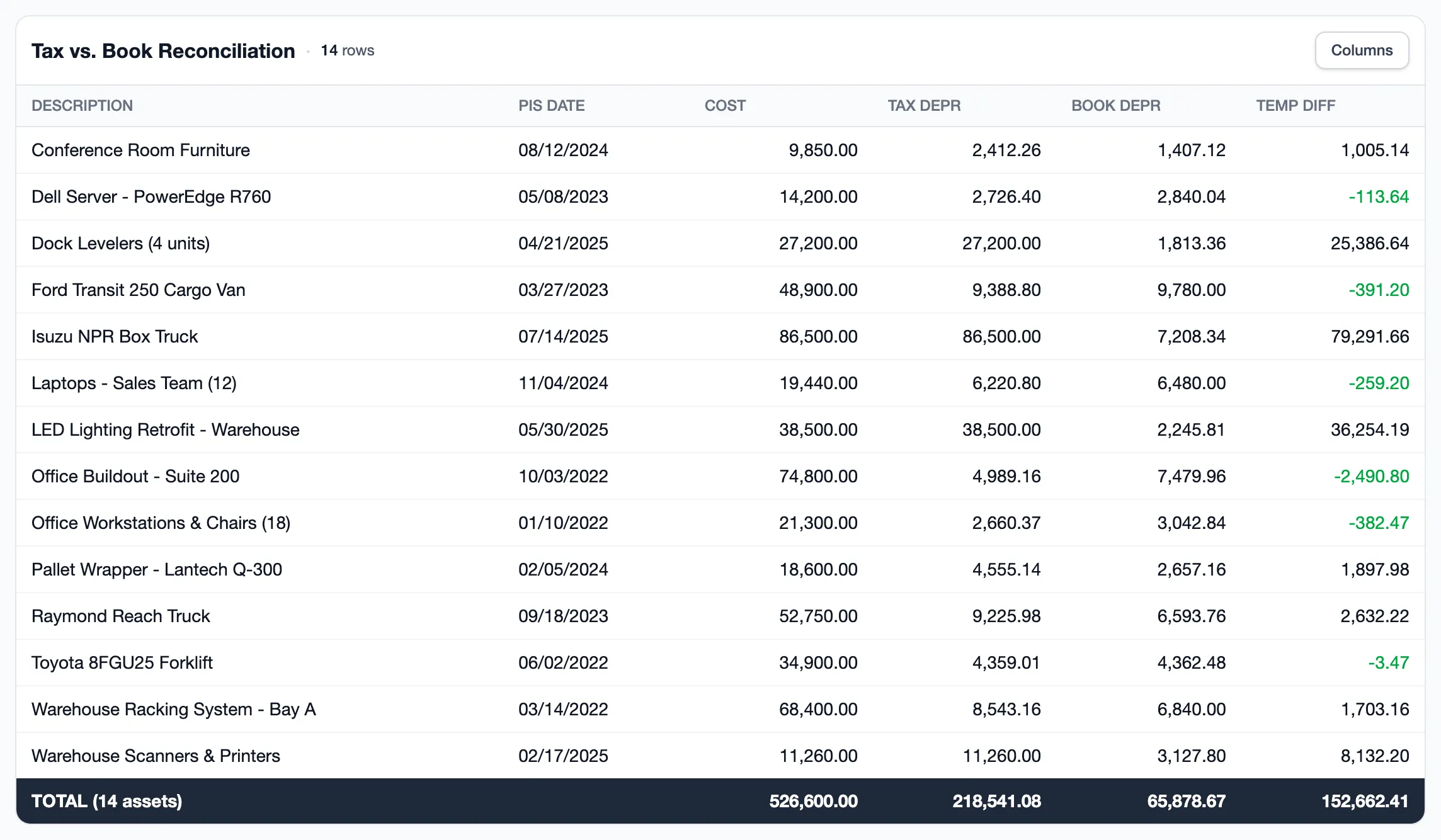
Tax vs. Book Reconciliation
Temporary and cumulative differences per asset, for ASC 740 and the Schedule M-1. Book and tax come from the same register, so nothing gets re-keyed to build it.
Want to see this on your own clients? Book a 15-minute call See pricing
State Tax
All 50 states plus DC. No per-state add-on pricing. Two-source verified conformity rules checked against state revenue department publications and Bloomberg Tax.
All 50 States + DC
Every U.S. jurisdiction covered. Conforming, fixed-period, and parallel calculation states. Conformity rules verified against state revenue publications and Bloomberg Tax. No per-state add-on pricing.
Multi-State Asset Allocation
Allocate assets across multiple states with percentage-based splits. State depreciation prorated by allocation before conformity rules apply. Import State and AllocationPercent columns directly from CSV or Excel.
14 Named State Forms
CA FTB 3885, NY CT-399/IT-399, NJ GIT-DEP, GA 600, NC CD-405, WI 4562W, CT-1120, PA REV-1834, IL-4562, VA Schedule ADJ, MD 500DM, AZ, FL, MN.
OBBBA Decoupling
States that decouple from federal OBBBA bonus handled automatically. Addback and subtraction schedules generated per jurisdiction. CA, NY, NJ, GA, NC, CT, PA, IL decoupling tracked.
State-Specific Limits
Per-state Section 179 limits (PA $25,000, NC limited). State bonus depreciation caps. Fixed-period recovery schedules for non-conforming states.
Want to see this on your own clients? Book a 15-minute call See pricing
Forms & Compliance
Automatic Form 4562 line mapping with per-activity support. Form 4797 disposals. AMT depreciation adjustments and QBI qualified property tracking.
Form 4562 (Parts I-V)
Automatic line-by-line mapping. Section 179 (Part I), bonus depreciation (Part II), MACRS (Part III), listed property (Part V). Part VI amortization as a supporting workpaper.
Per-Activity Form 4562
Separate 4562 per business activity (Schedule C, Schedule E rental). Section 179 proportional allocation across activities.
Form 4797 (Parts I-III)
Disposition gain/loss calculation. Depreciation recapture. Ordinary income vs capital gain classification for each disposed asset.
AMT Depreciation (Form 6251)
Pre-2018 GDS150 personal property adjustment. Form 6251 Line 2l total. Exempt asset display for post-2017 property not subject to AMT adjustments.
QBI Qualified Property (IRC 199A)
UBIA computation (original cost). Depreciable period tracking. Per-activity UBIA totals for the 2.5% W-2/UBIA limitation calculation.
Want to see this on your own clients? Book a 15-minute call See pricing
Import & Workflow
Primary DifferentiatorImport from any fixed asset register. AI-assisted method normalization from 75+ source formats. VIN lookup for GVWR. Year-end rollover and batch operations.
75+
Method Formats
160+
Code Variations
VIN
Auto-Classification
Excel/CSV Import
Column mapping with flexible header matching. Import from any fixed asset register format. Handles varied column names and data layouts automatically.
AI-Assisted Import
AI maps your spreadsheet columns automatically and flags data quality issues before import. Normalizes 75+ depreciation method codes (160+ variations) from CCH, Bloomberg Tax, UltraTax CS, and other source systems. Enable once in Settings — no per-import setup.
VIN Lookup
NHTSA vPIC API integration. Auto-populate make, model, year, and GVWR from a VIN. Batch enrichment for imported vehicle assets.
Year-End Rollover
Clone assets to next tax year with accumulated depreciation. Section 179 and bonus reset for new year. Activity assignments and entity structure cloned automatically.
Bulk Asset Operations
Bulk edit 9 fields, bulk dispose with gain/loss preview, bulk delete. Spreadsheet-style grid editing with Tab navigation. Inline click-to-edit cells. 30-second undo for all bulk operations.
Want to see this on your own clients? Book a 15-minute call See pricing
Reports & Export
Audit-ready reports in PDF and Excel. Per-client depreciation schedules, roll-forward reports, state adjustment reports, and GL account summaries for journal entries.
Depreciation Schedule
Per-client and per-entity detail with annual depreciation, cost basis, and net book value. Complete asset-level breakdown for workpaper documentation.
Roll-Forward Report
Beginning balance, additions, disposals, current depreciation, ending balance. Complete audit trail for year-over-year fixed asset movement.
State Adjustment Reports
Per-jurisdiction addback and subtraction schedules. State form data for 14 named state forms. Ready for state return preparation and review.
GL Account Summary
Grouped by GL account for journal entry posting and trial balance tie-out. Depreciation expense and accumulated depreciation by account.
PDF & Excel Export
Every report exports to both formats. QuestPDF for presentation-ready PDFs. ClosedXML for Excel workbooks with formatted data and formulas.
Tax Software Export
One-click export to UltraTax CS, Lacerte, ProSeries, CCH Axcess, CCH ProSystem fx, Drake, GoSystem, or ONESOURCE. Set your firm's tax software preference once, then export from any report. In-app import instructions for each target.
Want to see this on your own clients? Book a 15-minute call See pricing
CPA Features
Multi-firm architecture, role-based access, audit logging, data export, and collaboration tools built for accounting firm workflows.
Multi-Firm Architecture
Firm-level data isolation. Manage multiple client firms from one subscription. Per-firm reporting and asset management with complete data separation.
Role-Based Access
Preset roles (Technical Admin, Manager, Preparer, Reviewer, Read-Only), custom roles, and per-client access restrictions. Control who can edit assets, run reports, and manage settings.
Audit Logging
Every change logged with user and timestamp. Sign-ins and API calls also record IP address. Exportable audit trail for compliance reviews and internal quality control.
Want to see this on your own clients? Book a 15-minute call See pricing
See it on one of your clients.
Book a 15-minute call, or run your first client free. No credit card, no expiration.